
Great first layer, terrible second layer
Hello all,
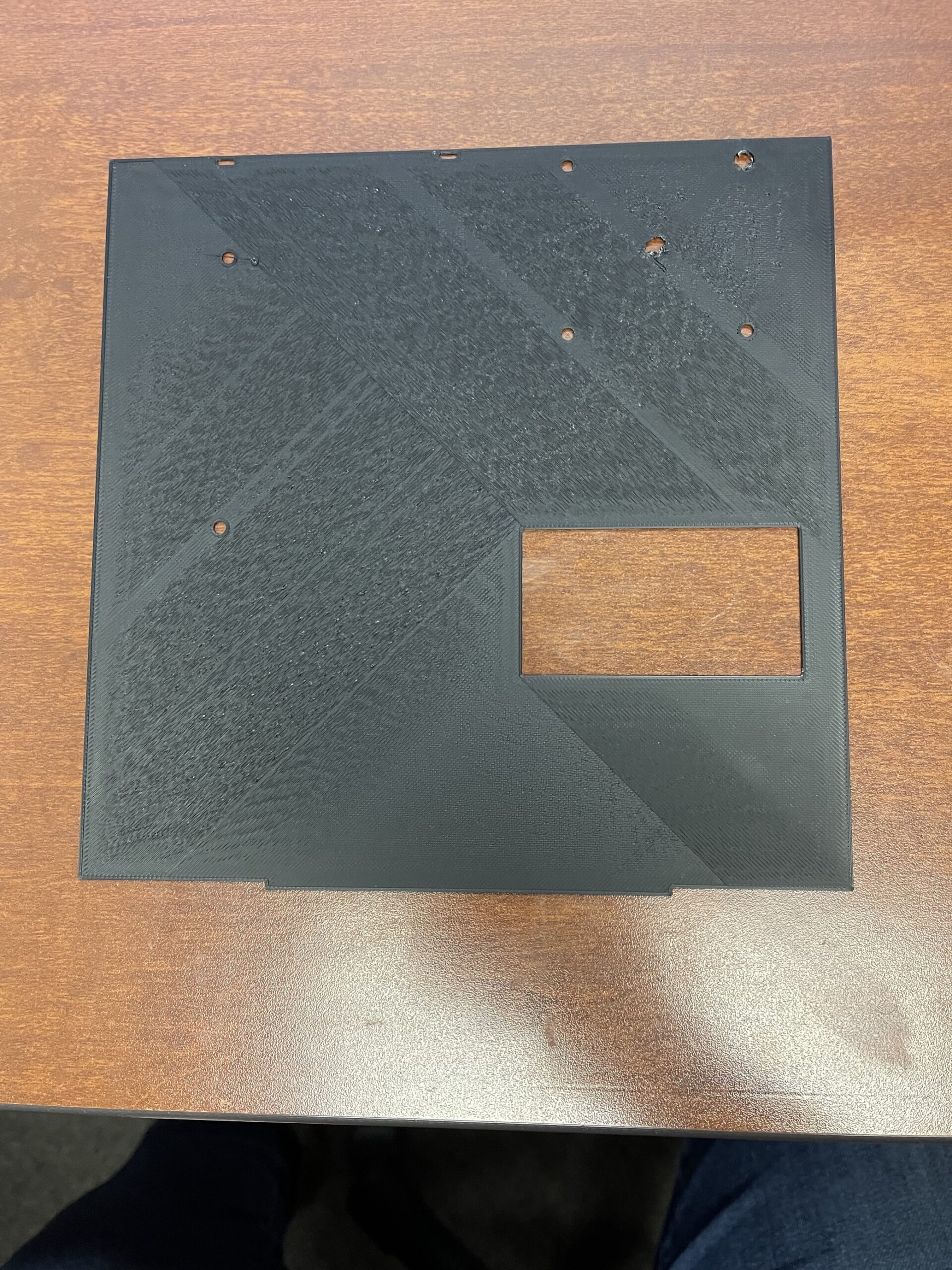
This issue has been plaguing me for a bit now and I cant find the issue. I've been trying to do this large almost bed sized print, and the first layer goes down perfectly, at least it looks like it to me. The issue comes with the second layer. It creates this super rough texture on the nearly perfect first layer and it snowballs from there. If I let in run, the third layer will scape the nozzle against the second as it continues and so on. I tried to see what the forums had to say, and the main post I found recommended turning off the fan for the second layer as well to see if the issue persists and it did. I did a bed level test from Thingiverse that turned out perfectly and did not present the same issues that this print had. I've run all the calibrations on the printer and messed with the Z-offset multiple times with no luck. The texture seems to get worse towards the middle of the bed, the corners and edges seem to get it less. Any help would be greatly appreciated.
Printer: I3 Mk3s
Filament: Polymaker PolyMax PLA
Profile: Default Generic PLA
Print, bed surface

Print top Surface

RE: Great first layer, terrible second layer
Hi, did you ever get this sorted?
I'm having the same problem. I have calibrated my e steps and extrusion multiplier, cleaned the bed with soap and water, checked bed level, replaced the nozzle, cleaned, disassembled and reassembled the hot end but nothing has helped.

RE: Great first layer, terrible second layer
This is a wild shot in the dark. The first layer is printed slower than the second. I'm guessing it has something to do with filament not being laid down at the proper rate, possibly due to nozzle temperature or feed speed, and causing gunk to build up on the nozzle. Do your filament settings have a different setting for the first layer? If it's hotter for the 2nd layer, or the feed rate is too high, it might cause things to ball up. Once that starts, it just keeps snagging more as things progress. It looks like there is a problem on the first layer also around the hole perimeters. Is this a new type/brand of filament, or one you have used successfully before?
I'm having similar issues with ironing, I'm about to post on that...

RE:
Just thinking aloud here but those large surfaces are very sensitive to overextrusion as the material has nowhere to go. It also has time to cool down before the next pass, making it stiff and less tolerant to accidental touch by the nozzle.
Looking at the print, I believe I can make out sections where the surface has been smoothened by the nozzle (behind the holes and at edges) and where not (most of the area).
You could look at filament friction in the PTFE tubes, I had similar variation around holes in solid surfaces that improved when friction was reduced.