
MMU Woes - Pulling my hair out.
So I ordered a MK2S and MMU and since the MMU wasn't ready I had them ship me the MK2S...
Ran flawlessly. I made a few minor tweaks but otherwise everything was awesome. I eventually got the MMU in the mail, but didn't really feel like tearing down the single-extruder (I bought a pre-assembled version).
I did notice my bed was a bit warped, so after talking to PRUSA they sent me a new one.
I also had a massive glob that killed my hot end. So I decided to install the MMU.
I can't get a decent print now...
I replaced the bed, redid the XYZ cal and reset live zero. I also replaced the PTFE tube in the MMU hot end as I had crushed the one in the kit with a new one from PRUSA.
Someone suggested I check the extrusion I was getting - because it seems I'm not getting enough material. That's fine (see pic) the problem seems to be a big lag in the start of extrusion.
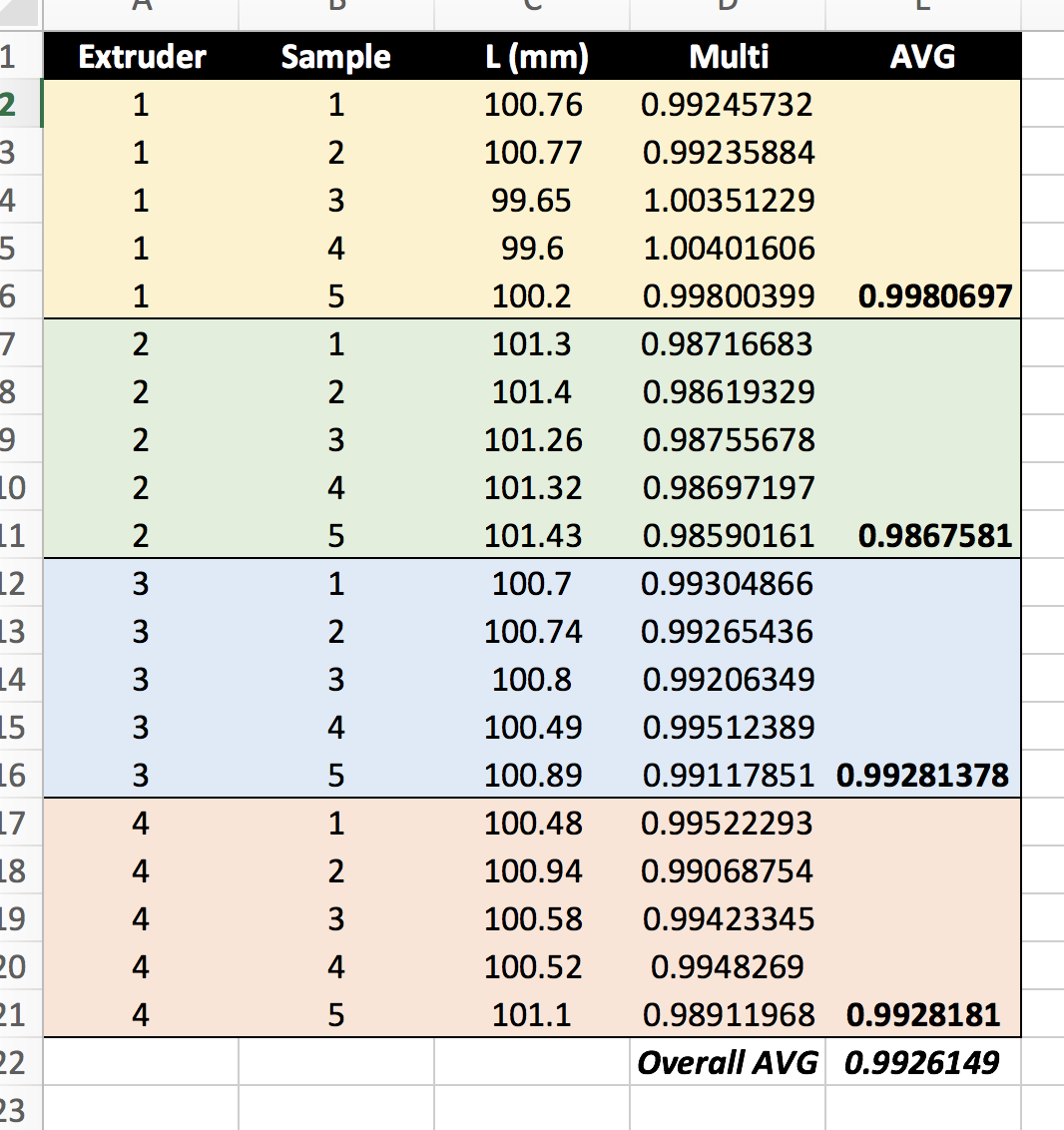
I think that's fine... I changed my multiplier in slicer to the avg.
When printing a cal square program I made with the latest slicer I needed to add 3 loops around the outside to get it to actually extrude, when its running the code the extruder doesn't seem to deposit material right away - see pic of gap:
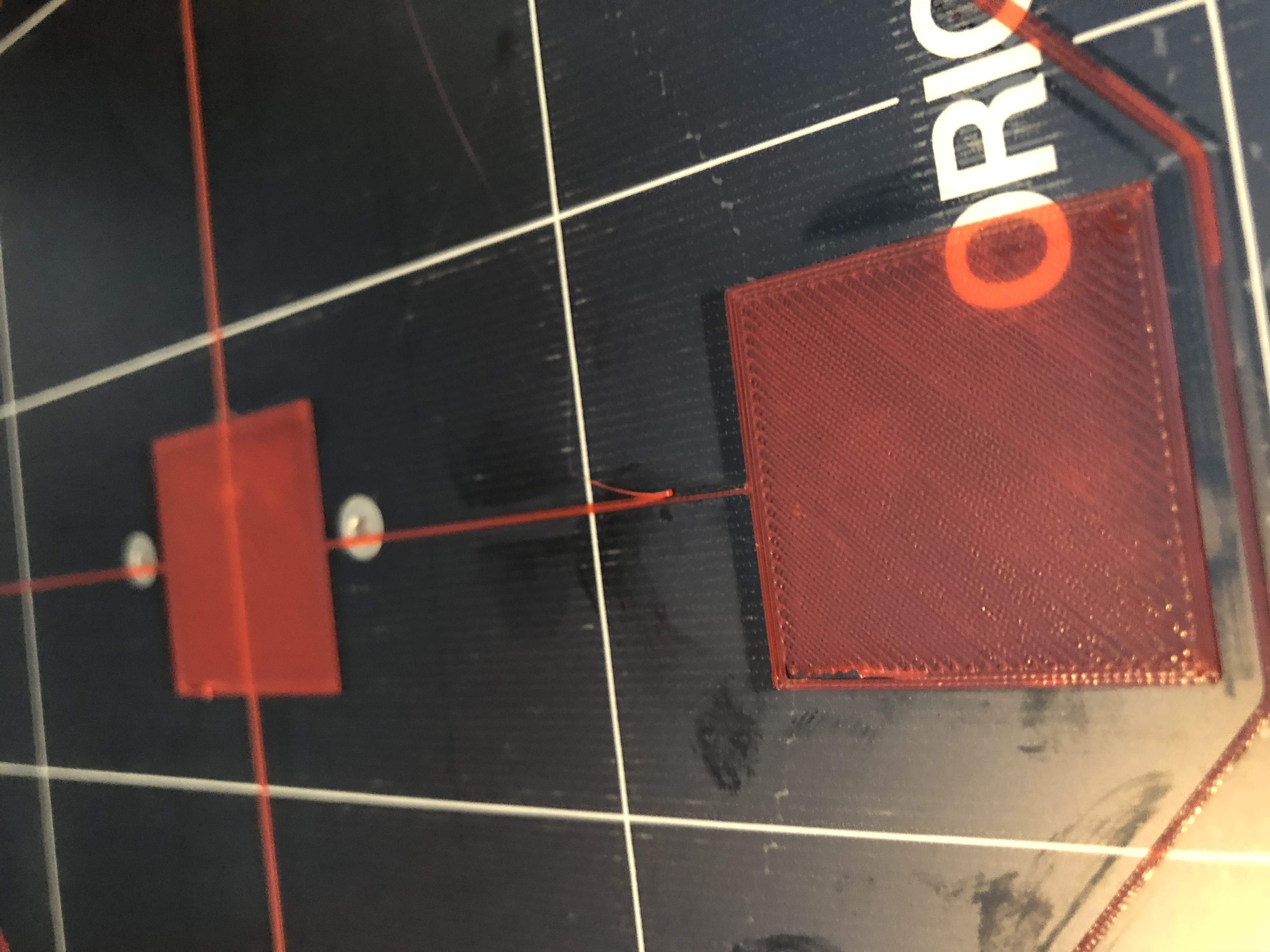
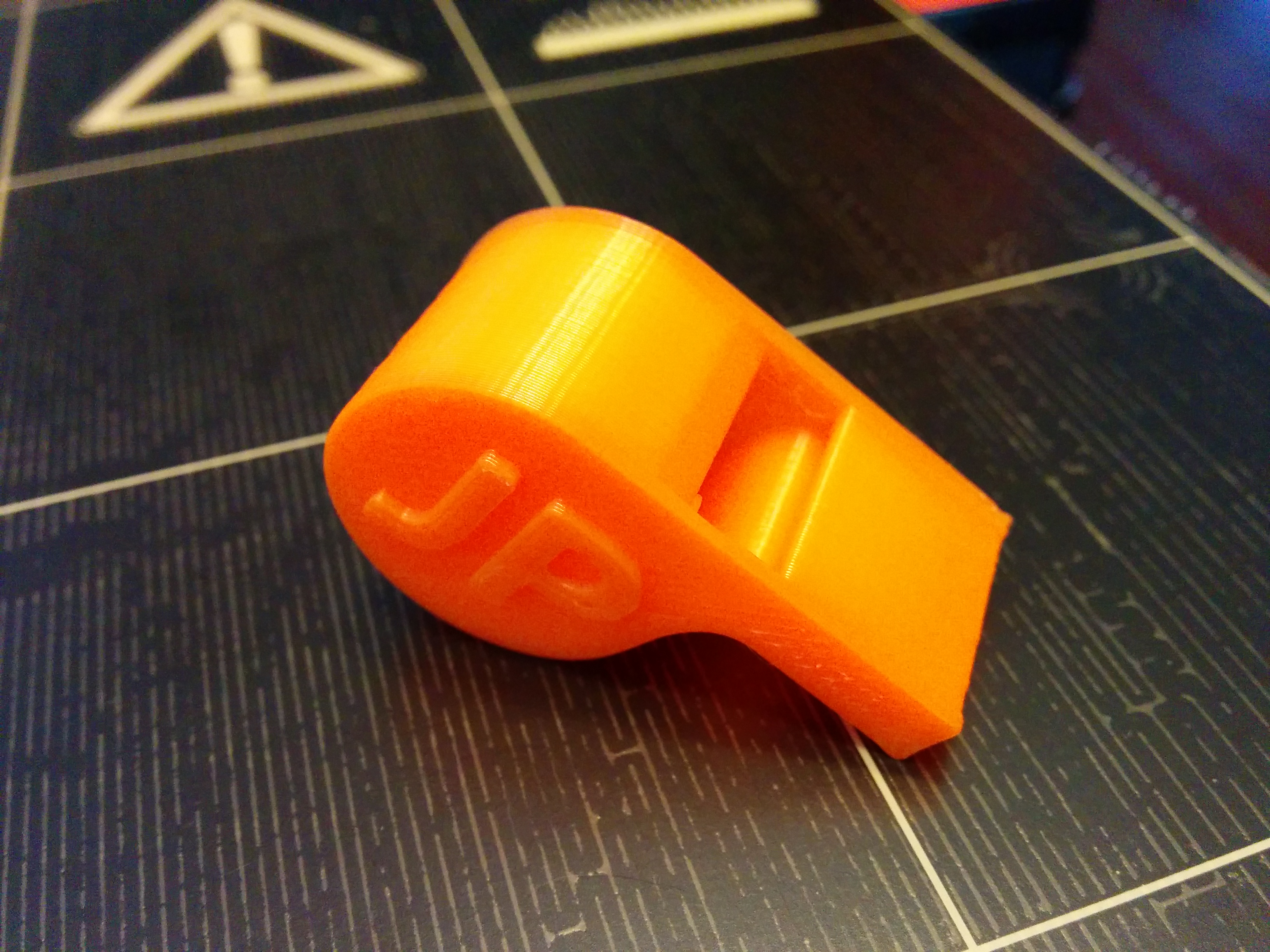
This kills small prints, just trying to use the included MMU single extruder whistle this is what I get:
Here's a link to a video that shows the beginning of the cal square program and how much it moves before extruding...
https://www.dropbox.com/s/vzdua7e9l0uidnr/Video%202018-01-06%2C%204%2020%2018%20PM.mov?dl=0
So frustrated... I went from having a printer that was killer and the envy of other people with printers I showed stuff to in terms of print quality to not even being able to print the included GCODE.
Just placed an order for another hot end and the parts of the extruder that got destroyed by the glob so I can go back to a single extruder... if someone can help me get this working I'd appreciate it, otherwise the MMU is going in the bin.

Re: MMU Woes - Pulling my hair out.
There is (was?) a bug with the gcode in slic3r that added an E-4 where it shouldn't be. Look at the first few dozen lines of gcode, after it's done priming it's not supposed to say E-4, it's supposed to be E0. So it retracts an extra 4mm of filament... which is the delay in extrusion you're seeing. Just delete the line and see if that fixes it in your gcode.
You've also got some minor bed adhesion issues between squares in that test video of yours, but that's a separate issue (temp/bed cleanliness/nozzle height).
Re: MMU Woes - Pulling my hair out.
I attached a zip of the cal-squares.... I'm not sure how far down to look, I do see G92 E0.0 and G1 E-4 F1000.0 in the first bit there?
I just downloaded the latest version of Slic3r today to make sure I had things right.
But would that error also be in the GCODE from Prusa? The pic of the whistle is from the driver/files package. Mind you - one version back as I didn't copy the latest ones onto the SD card. Crap!! Maybe I should copy them over and compare the files? See if there's any difference.
I think my bed temp is too low - now that its freezing here (-40C with the windchill this morning...) I was reading in some other threads that people run their bed hotter in the winter. I was able to get a whistle off without it totally eating itself but the bottom layer looks pretty crappy since it didn't extrude the border fully and then sucked it into the first layer infill.
I may have to use the GCODE settings to level my bed... I currently have the right mesh levelling all the way at +50 and it still wrinkles a little. Most of my prints are small so if I could at least get the centre of the bed printing reliably I could work on tuning the rest in after.
At this point I would just be happy to get a print that doesn't self destruct... I was kinda Jonesed about getting the MMU up and running and was thinking of getting a MK3 once they were available with the magnetic bed but right now I can't print anything - this is a semi-hobby and semi-work unit. I managed to buy it for the shop but keep it at home so I can print fixtures and other stuff we need in my "spare time". Right now I have a half dozen parts I need that I can't print... really making it hard to justify buying another printer. 🙁
; generated by Slic3r Prusa Edition 1.38.7-prusa3d on 2018-01-06 at 13:17:03
;
; external perimeters extrusion width = 0.45mm
; perimeters extrusion width = 0.45mm
; infill extrusion width = 0.45mm
; solid infill extrusion width = 0.45mm
; top infill extrusion width = 0.45mm
; first layer extrusion width = 0.42mm
M107
M115 U3.1.0 ; tell printer latest fw version
; Start G-Code sequence START
T?
M104 S215
M140 S60
M109 S215
M190 S60
G21 ; set units to millimeters
G90 ; use absolute coordinates
M83 ; use relative distances for extrusion
G28 W
G80
G92 E0.0
M203 E100
M92 E140
G1 Z0.250 F7200.000
G1 X50.0 E80.0 F1000.0
G1 X160.0 E20.0 F1000.0
G1 Z0.200 F7200.000
G1 X220.0 E13 F1000.0
G1 X240.0 E0 F1000.0
G1 E-4 F1000.0
G92 E0.0
M900 K200; Filament gcode
G21 ; set units to millimeters
G90 ; use absolute coordinates
M83 ; use relative distances for extrusion
;BEFORE_LAYER_CHANGE
;0.2
G1 Z0.200 F7200.000
;AFTER_LAYER_CHANGE
;0.2
G1 E-4.00000 F4800.00000
G1 Z0.800 F7200.000
G1 X7.092 Y121.160 F7200.000
G1 Z0.200 F7200.000
G1 E4.00000 F3000.00000
M204 S1000
G1 F1800
G1 X6.870 Y120.073 E0.03451
G1 X6.906 Y89.521 E0.95088
G1 X7.046 Y88.962 E0.01793
G1 X7.284 Y88.442 E0.01780
G1 X7.615 Y87.971 E0.01793
G1 X8.028 Y87.568 E0.01793
G1 X108.347 Y7.341 E3.99785
G1 X109.119 Y6.995 E0.02631
G1 X109.955 Y6.869 E0.02631
G1 X140.004 Y6.869 E0.93522
G1 X141.030 Y7.043 E0.03237
G1 X141.945 Y7.546 E0.03250
G1 X242.319 Y87.896 E4.00155
G1 X242.907 Y88.836 E0.03451
G1 X243.130 Y89.927 E0.03465
G1 X243.094 Y120.479 E0.95088
G1 X242.954 Y121.038 E0.01793
G1 X242.716 Y121.558 E0.01780
G1 X242.385 Y122.029 E0.01793
G1 X241.972 Y122.432 E0.01793
G1 X141.649 Y202.662 E3.99798
G1 X140.877 Y203.006 E0.02631
G1 X140.041 Y203.131 E0.02631
G1 X109.521 Y203.094 E0.94985
G1 X108.747 Y202.869 E0.02510
G1 X108.052 Y202.451 E0.02524
G1 X7.678 Y122.101 E4.00155
G1 X7.123 Y121.211 E0.03264
G1 X7.440 Y121.016 F7200.000
G1 F1800
G1 X7.246 Y120.057 E0.03046
G1 X7.279 Y89.575 E0.94868
G1 X7.613 Y88.625 E0.03134
G1 X8.267 Y87.859 E0.03134
G1 X108.547 Y7.660 E3.99634
G1 X109.226 Y7.357 E0.02315
G1 X109.962 Y7.246 E0.02315
G1 X140.004 Y7.246 E0.93499
G1 X140.905 Y7.399 E0.02845
G1 X141.710 Y7.841 E0.02858
G1 X242.040 Y88.149 E3.99967
G1 X242.558 Y88.980 E0.03046
G1 X242.754 Y89.943 E0.03059
G1 X242.721 Y120.425 E0.94868
G1 X242.387 Y121.375 E0.03134
G1 X241.733 Y122.141 E0.03134
G1 X141.449 Y202.342 E3.99647
G1 X140.770 Y202.644 E0.02315
G1 X140.034 Y202.754 E0.02315
G1 X109.575 Y202.721 E0.94795
G1 X108.896 Y202.523 E0.02201
G1 X108.287 Y202.156 E0.02214
G1 X7.957 Y121.847 E3.99967
G1 X7.472 Y121.067 E0.02859
G1 X7.790 Y120.875 F7200.000
G1 F1800
Re: MMU Woes - Pulling my hair out.
This line is the problem:
G1 E-4 F1000.0
Change it to G1 E0 F1000.0 and try printing again, it'll fix the issue with the missing extrusion at start.
Re: MMU Woes - Pulling my hair out.
Every time it appears or just the first time?
Re: MMU Woes - Pulling my hair out.
Just the first one.