
RE:
Would be nice if there was space to store max volumetric flow (for example) for different nozzles as user fields but then I understand that with 316 bytes available, there is not a lot to work with. What I have in my head is to be able to scan a spool and it loads the profile into prusa slicer automatically.
Playing with the OpenPrintTag generator I filled in as much as I could and there is 63bytes free. But then when I look at the data format specification there is either a lot behind the scenes in the online generator, or some fields that the online generator doesn't give the option to fill in. You may want to look at the discussion about MVF on the github issue if you have any suggestions for implementation.
Or, there is a URL field nominally for the manufacturer's product page. I suppose you could hijack that field for your own web page that your own accessory program scrapes for what ever extra settings you want.
See my (limited) designs on:
Printables - https://www.printables.com/@Sembazuru
Thingiverse - https://www.thingiverse.com/Sembazuru/designs

RE: How to write an OpenPrintTag
Has anyone found a way yet to write a tag using Android?

RE: How to write an OpenPrintTag
The Solution under
https://forum.prusa3d.com/forum/postid/771459/
had worked for me
RE: How to write an OpenPrintTag
The Solution under
https://forum.prusa3d.com/forum/postid/771459/
had worked for me
Are you referring to NFC.cool? Are you on Android? I haven't tried it yet, but from what I can tell from that thread, the comments in the Play Store, and on NFC.cool's own website, it doesn't look like the OpenPrintTag functionality that is in the iOS version of that app has made it to the Android version of that app. Am I wrong?
See my (limited) designs on:
Printables - https://www.printables.com/@Sembazuru
Thingiverse - https://www.thingiverse.com/Sembazuru/designs
RE: How to write an OpenPrintTag
My fingers were faster than my brain,
I apologize. The solution is for iOS.

RE: How to write an OpenPrintTag
Hi, dev of NFC.cool here.
The caveats are that the app is not free (there is a 3 day trial)
OpenPrintTag is and will always be a free feature in my app. No need to pay.
and the UI is super annoying (to me at least)
I would like to understand what exactly is annoying. Please let me know!

RE:
Hi, dev of NFC.cool here.
The caveats are that the app is not free (there is a 3 day trial)
OpenPrintTag is and will always be a free feature in my app. No need to pay.
and the UI is super annoying (to me at least)
I would like to understand what exactly is annoying. Please let me know!
- OpenPrintTag is (for some reason) part of NFC Expert. In order to unlock NFC Expert, I had to purchase the application.
- Format is flaky. It sometimes fails with "Failed to write NDEF data"
- OpenPrintTag Read/Write/Inport & Export should be in a submenu of NFC Expert -> OpenPrintTag and not as a dropdown in the upper right corner. It's not intuitive. Took me awhile to find it.
- Does OpenPrintTag really belong under NFE Expert? Why not in it's own section underneath NFC Business Card? Expert should be for low-level functions like formatting, raw read/write etc
- Would be helpful to have a QR scanner for Prusament reals.
- The link to compatible tags under help should search for SLIX2 and not SLIX. They are not the same.
RE: How to write an OpenPrintTag
- Would be helpful to have a QR scanner for Prusament reals.
Remember, the QR code on Prusament reals is a standard web URL. For automated data import the reader would need to scrape the web page (and hope Prusa doesn't reformat the pages in any way).
See my (limited) designs on:
Printables - https://www.printables.com/@Sembazuru
Thingiverse - https://www.thingiverse.com/Sembazuru/designs
RE: How to write an OpenPrintTag
Yes. Get that. But it could also be a JSON payload from a REST endpoint as well. I doubt Prusas app scrapes an HTML web page directly. Although it wouldn’t surprise me I suppose.
RE:
Thanks for the feedback! Let me clarify some things:
OpenPrintTag is (for some reason) part of NFC Expert. In order to unlock NFC Expert, I had to purchase the application.
No, that is simply not true. The NFC Expert menu point is open for everyone as well as OpenPrintTag. Some other functions under that menu point are paid, yes.
Format is flaky. It sometimes fails with "Failed to write NDEF data"
Unfortunately NFC has many variables in the process of scanning that may cause fails (tag antenna size, the user putting the tag too briefly or not close enough to the sensor, my code, etc.).
OpenPrintTag Read/Write/Inport & Export should be in a submenu of NFC Expert -> OpenPrintTag and not as a dropdown in the upper right corner. It's not intuitive. Took me awhile to find it.
Agreed, this could definitely be better. I'll think about what I could do.
Does OpenPrintTag really belong under NFE Expert? Why not in it's own section underneath NFC Business Card? Expert should be for low-level functions like formatting, raw read/write etc
Yeah in my opinion it should be there. This function is used by a small fraction of my user base and it's a very specialized feature.
Would be helpful to have a QR scanner for Prusament reals.
There is a QR scanner in the app 😉
The link to compatible tags under help should search for SLIX2 and not SLIX. They are not the same.
Good catch, thx. I will fix that. (However Amazon often shows ads or unrelated products for search terms anyways which can lead to buying the wrong thing.)

RE: How to write an OpenPrintTag
Ah, THERE it is. Spent a good twenty minutes looking for that dang 'Import' feature.
 Press the NFC tag in top right of screen
On the NFC screen, goto NFC Expert -> OpenPrintTag and enter in all the field information. In the upper right corner there an NFC button. Click on that
and you can then write to the tag. Otherwise you can use the OpenPrint Generator, download the bin, click on the NFC button,import the BIN then write it to the tag.
RE: How to write an OpenPrintTag
No, that is simply not true. The NFC Expert menu point is open for everyone as well as OpenPrintTag. Some other functions under that menu point are paid, yes.
Well, I had to purchase the app to access the Expert menu. It's not a big deal. I'm just reporting my experience.
Unfortunately NFC has many variables in the process of scanning that may cause fails (tag antenna size, the user putting the tag too briefly or not close enough to the sensor, my code, etc.).
NFC Tools does not have this issue
Yeah in my opinion it should be there. This function is used by a small fraction of my user base and it's a very specialized feature.
Doesn't make any sense to put it there. It's not an "expert" function. It took me some time to find it initially.
There is a QR scanner in the app 😉
It doesn't behave the same way that the Prusa App does. It is not importing the OpenTagFields
RE: How to write an OpenPrintTag
I used NFC Cool to write the tag, but first:
- It was not NDEF formatted, and NFC Cool could not format the tag.
I used NFC Tools to NDEF format the tag.
I found a few apps (NFC Tools,
RE:
Thank you very much.
First time user here. The APP is awesome.
- Ignore my support email. I finally found the Import/Export button !
- I have a spool from '23. The ID contains two letters. I could not figure out how to change the number keyboard to enter the letters for the GTIN/EAN Barcode. That problem will probably soon take care of itself as soon as I consume all the old filaments.
- I could not write the new tag (initially) because it was not NDEF formatted.
- I then could not NDEF format the new tags with the program because it was not writeable. (perhaps I have to 'unlock' first)
- I resolved the NDEF format issue by using NFC Tools to format the tag. Then I was able to Import the bin file generated on OpenPrintTag, edit it for the specific information for my filament... oh wait. I did that, but let me revise that step.
- Use the PRUSA app to scan the QR Code for the filament !
- Use the 'Clone to NFC' option. Write to the tag.
- Now I don't have to type in a GTIN Number !!!
- Use the NFC reader to read the tag.
- Select EDIT
- Enter the new spool total weight in grams.
- Press 'Write to Tag'
- Um, doesn't have the new info, scan tag again.
- Ah, it is working. It has an initial weight (stays constant at 1,023 g) and a spool weight (193 g). Up at the top, it is showing 716 g / 1,023 g of filament left !
- SWEET ! It works.
- I resolved the NDEF format issue by using NFC Tools to format the tag. Then I was able to Import the bin file generated on OpenPrintTag, edit it for the specific information for my filament... oh wait. I did that, but let me revise that step.
Hi, dev of NFC.cool here.
RE: How to write an OpenPrintTag
Well, on the blank OpenPrintTag, I used a box cutter to carefully cut out the center and to cut the outer paper to the tags dimensions. I then slipped it into the filament spool without removing the sticky backing.
Seems to be working fine.
The PrUSA filament spool is a honeycomb texture. It does not seem like the OpenPrintTag will stick well to that surface.
My goal with this topic is to learn, but also help others.
RE: How to write an OpenPrintTag
Well, on the blank OpenPrintTag, I used a box cutter to carefully cut out the center and to cut the outer paper to the tags dimensions. I then slipped it into the filament spool without removing the sticky backing.
Seems to be working fine.
The PrUSA filament spool is a honeycomb texture. It does not seem like the OpenPrintTag will stick well to that surface.
My goal with this topic is to learn, but also help others.
There are OpenPrintTag spool adapters on Printables. Use one of those. That way you can transfer to a different spool when that one is used up.
RE: How to write an OpenPrintTag
The PrUSA filament spool is a honeycomb texture. It does not seem like the OpenPrintTag will stick well to that surface.
The tags use good adhesive. Getting them to stick on Prusa spools has not been a problem for me.
RE: How to write an OpenPrintTag
Can’t do that. You told me it was mandatory to ‘roll my own’
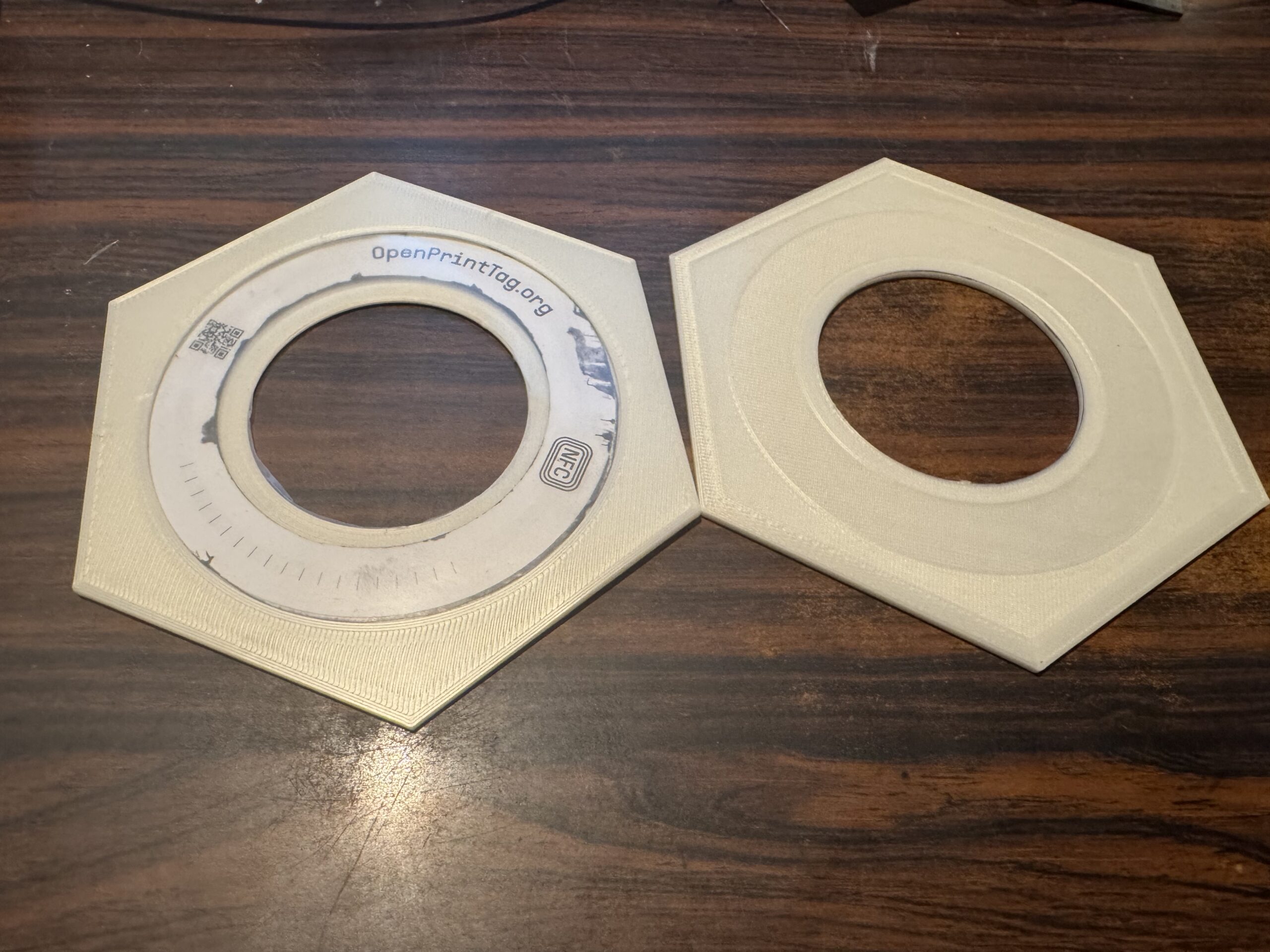
So I learned how to use the basics of OnShape. And made this overly complicated tag holder.
Using a bit of plastic from a sheet protector to hold in the tag without sticking it down…
Printed solid at 0.1mm layer height in Prusa Vanilla white. Weight 12 grams
curious effect: it has trouble reading when it is sitting on my metal desk. Works better when it is not near the desk. Must be trashing the signal.
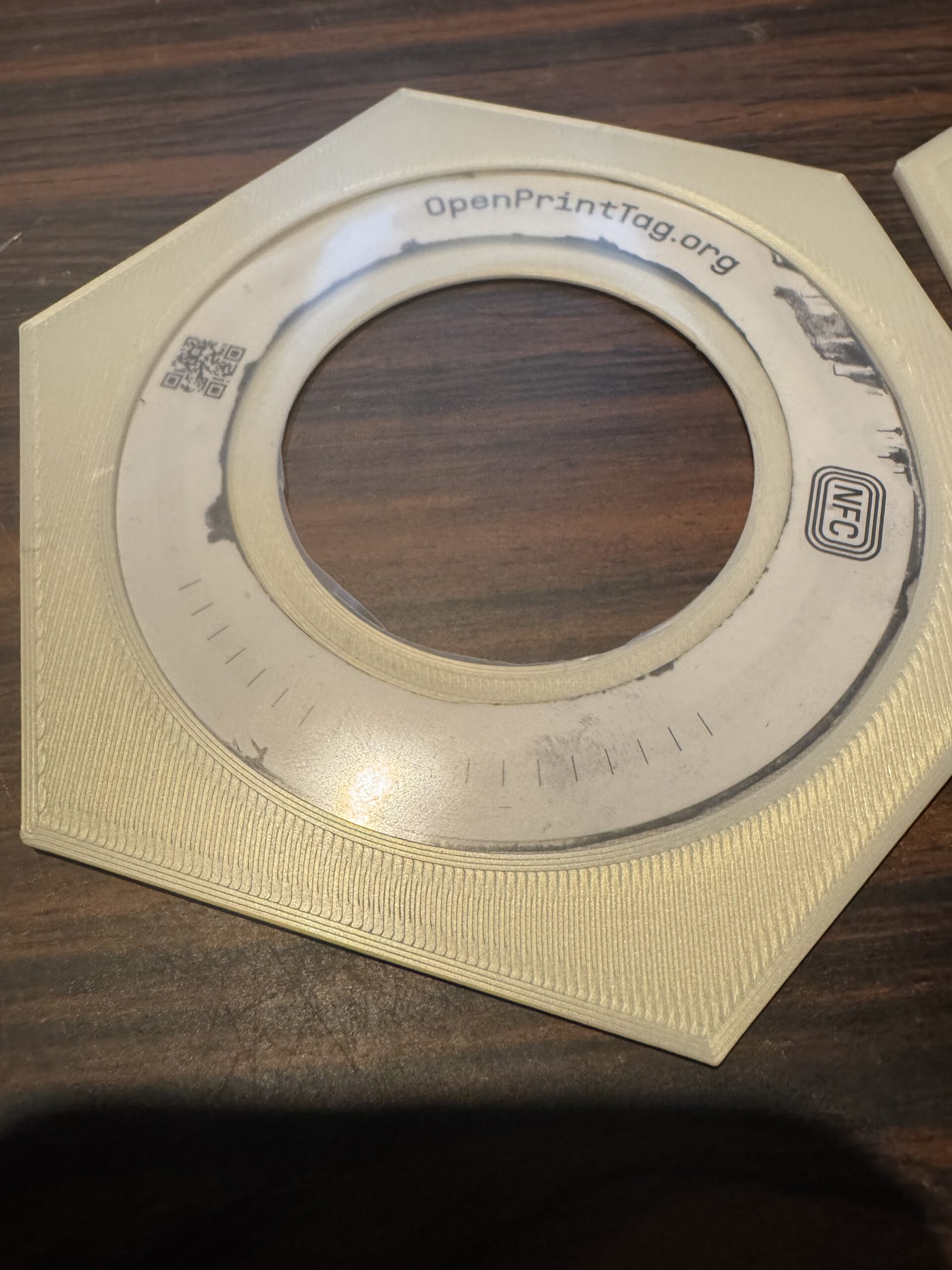
The second attempt with the first attempt.
There are OpenPrintTag spool adapters on Printables. Use one of those.

RE: How to write an OpenPrintTag
I’ve found NFC.cool cannot rewrite tags created by the Prusa connect app. I did the following.
1. Use prusa connect material handler to read the QR code on a reel
2. Clone that to the NFC tag. (I had some blank ones).
3. Use NFC.cool open expert menu open print tag to read the tag.
4. Modify a field
5. Write to the tag.
You’ll be met with a message that the tag is not NDEF formatted. So the app still needs some work. It’s not completely compatible with what Prusa writes to the tag.
RE:
I’ve found NFC.cool cannot rewrite tags created by the Prusa connect app. I did the following.
1. Use prusa connect material handler to read the QR code on a reel
2. Clone that to the NFC tag. (I had some blank ones).
3. Use NFC.cool open expert menu open print tag to read the tag.
4. Modify a field
5. Write to the tag.
You’ll be met with a message that the tag is not NDEF formatted. So the app still needs some work. It’s not completely compatible with what Prusa writes to the tag.
Use the tag formatter in NFC.cool or NFC Tools to format the tag. Then write to the tag.