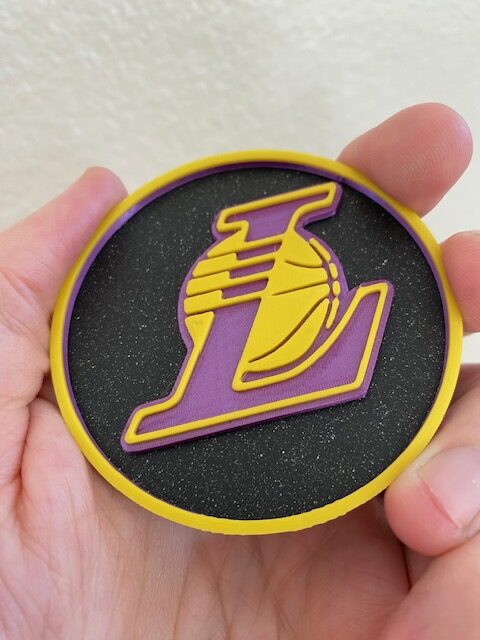
MK4S ironing settings different than MK4?
Hi all, I recently got an MK4S with an MMU factory assembled. I have the MMU3 printing fine and working as I would expect and have done a few successful color change prints, but I’m noticing ironing settings and prints that used to print flawlessly on my MK4 (image attached) are not working well on the new printer (flow 30%, adaptive cubic infill 25%, 4+ layers for ironing). You can see all the protruding dots on the yellow “L” logo.
I know this is a quality model and it prints really well on the MK4 with those exact settings, am I missing a setting on the MK4S/MMU?
Also I’ve noticed the whole top is more rough/jagged on the MK4S than the MK4, not sure if that’s the fault of the ironing, I do iron the whole top layer.
Any help or guidance is appreciated!
RE: MK4S ironing settings different than MK4?
Think I solved both my issues, in the attached image.
1.) I just realized my printer table was wobbly, I think the yellow filament (top layer) actually wobbled out of the preload and missed loading when it was time for it, it still did the hot end for ironing but without flow and caused the bumps (you can see it left gaps in the image that shouldn't be there if it truly ironed). I put a spare filament spool holder under the second side mounted filament slot (yellow) and it took care of the excessive wobble.
Tweaked my ironing settings:
Flow Rate 30% > 26%
Spacing Between Ironing Passes .1 mm > .2 mm
Ironing Type: All top surfaces
(speed) - Ironing: 10mm > 150mm
Multiple Extruders - no sparse layers > enabled
Infill = 25%, Adaptive Cubic
...all others settings left default. I just ran a test that turned out pretty solid (attached), more info to come.