
Poor prints after the recent firmware update
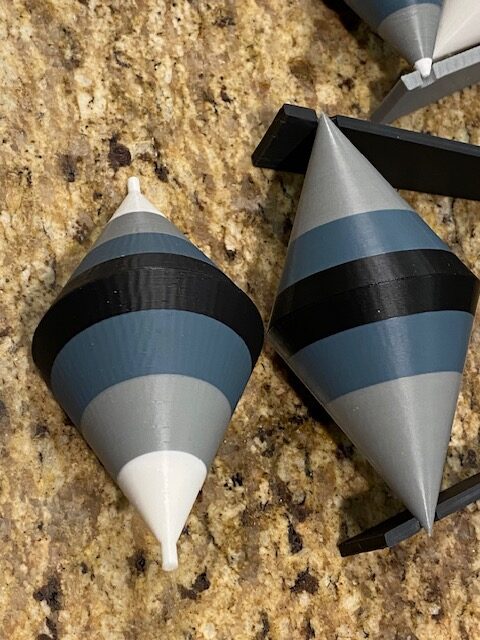
The print quality, using the same settings and material, deteriorated. This happened after the most recent firmware update to my Mark4S. The current firmware version is 6.4.0+11974. Looks like the input shape needs to be calibrated however the necessary module requires that I purchase a part to preform the calibration. I have included a photo. The cone on the left is the result after the firmware update. The cone on the right is before the update. Any thoughts or solutions?

RE:
I should add that the printer is in it's stock form down to the original nozzle. I'm using the same PLA as well as the Prusa Slicer. Minor VFA's were noted prior to the update but the increase unacceptable.

How old is the nozzle?
Cheerio,
RE: Poor prints after the recent firmware update
The nozzle is an original as supplied with the MK4s upgrade. It was printing fine until the firmware update.

RE: Poor prints after the recent firmware update
I don’t think it’s the firmware. The print is showing signs of a worn nozzle. Brass nozzles have a limited life-span. Would start by buying a new nozzle.
RE: Poor prints after the recent firmware update
I don’t think it’s the firmware. The print is showing signs of a worn nozzle. Brass nozzles have a limited life-span. Would start by buying a new nozzle.
But buy a hardened one, they last a lot long
RE: Poor prints after the recent firmware update
The nozzle was new with the recent 4s upgrade and it was printing fine. Currently the installed Nozzle has less than 75 hours usage and I print PLA exclusively. I doubt seriously that the nozzle is the problem.
It does seem unlikely - but examine the nozzle with a magnifying glass and check for damage.
Cheerio,
RE: Poor prints after the recent firmware update
Thanks for your input, however I think were seeing VFA's . I can't prove it's related to the recent firmware update but that's when it became a problem. What really lights my fire is the fact a re-calibration, if required, will cost me to add a part that should have been included with the original kit. And just to add insult to injury the shipping fee actually exceeds the cost of the part.
RE:
Thanks for your input, however I think were seeing VFA's . I can't prove it's related to the recent firmware update but that's when it became a problem. What really lights my fire is the fact a re-calibration, if required, will cost me to add a part that should have been included with the original kit. And just to add insult to injury the shipping fee actually exceeds the cost of the part.
VFA are controlled (mostly) by belt tension but not sure how much that applies to the MK4S. Have you checked the belts recently? It could also be caused by a worn Nextruder gear or motor.
The conical geometry confuses the issue a little but these don't look like classical VFA's ... have you checked the nozzle for damage?
Cheerio,

RE: Poor prints after the recent firmware update
Thanks for your input, however I think were seeing VFA's . I can't prove it's related to the recent firmware update but that's when it became a problem. What really lights my fire is the fact a re-calibration, if required, will cost me to add a part that should have been included with the original kit. And just to add insult to injury the shipping fee actually exceeds the cost of the part.
VFA are controlled (mostly) by belt tension but not sure how much that applies to the MK4S. Have you checked the belts recently? It could also be caused by a worn Nextruder gear or motor.
Apologies, if I may, just for once, bluntly disagree (With Core One in mind, don't know the other models):
VFAs are controlled mostly by speed. Drop below 50 or 45 mm per second and they should disappear:
@jan.d.slay posted a bunch of test prints on the recent bushings-vs-bearings topic, and they look very consistent in this regard. So that's the first thing I'd try, slow outer perimeters or just use the front panel speed dial.
Worn nozzle: search for "sad benchie", different failure mode from VFAs.
RE:
Apologies, if I may, just for once, bluntly disagree (With Core One in mind, don't know the other models):
VFAs are controlled mostly by speed. Drop below 50 or 45 mm per second and they should disappear:@jan.d.slay posted a bunch of test prints on the recent bushings-vs-bearings topic, and they look very consistent in this regard. So that's the first thing I'd try, slow outer perimeters or just use the front panel speed dial.
Worn nozzle: search for "sad benchie", different failure mode from VFAs.
Fair enough. Going by Josef Prusa's post in twitler: PSA: VFA update 3 on the Core One at least it's a combination of belts, input shaping and speed. With (presumably) the last two predominating on a MK4S. That said, I'm still either going with worn nozzle or nextruder motor.
RE: Poor prints after the recent firmware update
Ooh, even cherries on top. Prusa blog posts are always uplifting. I really should buy more of their stuff.
Now you may be right, of course - second-guessing the given information is part of the game. As in "let's put moisture aside for now" 🙂
The question I see is, how strongly does it correlate with the mentioned FW upgrade that couldn't break hardware in itself, but might affect dynamics or just plain speed. E.g. volumetric flow rate is optimized in newer firmware (this just as a possibility, an example without actual evidence). It stops capping perimeter speed. Enter VFAs.
RE: Poor prints after the recent firmware update
I ask the AI to summarize the changes between the current and last stable firmware release specific to the MK4S:
1. Enhanced Retraction & Head Parking
Auto-retract support for the MK4 family, which improves oozing control at end-of-print.
More “polite” parking — higher Z after finish to avoid ooze mess. (While auto-retract shows up prominently in 6.4.0 notes, improvements to head parking behavior benefit MK4S ergonomics.)
2. Print Sheet & Workflow Improvements
Print sheet detection (MK4 family).
Improved print status messages to clarify printer state during operations.
3. Prusa Connect & Connectivity Enhancements
Faster/more responsive Prusa Connect interaction (WebSocket backend, lower latency, richer command responsiveness).
4. Calibration & Motion Adjustments
“Lazier homing” and more cautious calibration moves reduce aggressive probing or head motions after idle.
5. Filament Handling Overhaul
Reworked filament sensor evaluation logic for more reliable detection.
New options to continue after nozzle cleaning failure.
6. Other Quality-of-Life Additions
Autoload improvements (e.g., likely easier preheat/load workflows).
Wi-Fi signal strength indicator.
Selective factory reset options.
So: I asked ChatGPT "Why are AI summaries frequently garbage?"
It replied:
1. They optimize for plausibility, not truth
Most AI systems (like large language models) are trained to predict the most likely next word — not to verify facts or ensure logical consistency.
... and another 150 lines that I won't bore you with.
Cheerio,
RE:
So: I asked ChatGPT "Why are AI summaries frequently garbage?"
It replied:
1. They optimize for plausibility, not truth
Most AI systems (like large language models) are trained to predict the most likely next word — not to verify facts or ensure logical consistency.
... and another 150 lines that I won't bore you with.
Cheerio,
This is from a diff I created from the git repo. I couldn't be bothered to summarize it myself since it's the weekend and I'm off the clock. As a professional software engineer I can give you a human summary if that will help.
RE: Poor prints after the recent firmware update
Here is the diff >3000 changed files which is why AI's are better than humans in this regard: https://github.com/prusa3d/Prusa-Firmware-Buddy/compare/v6.2.6...v6.4.0